

You told us what was slowing you down. We listened. Here's what we built.
This is our third Customer Love Sprint—and every feature on this page exists because you asked for it. Over two weeks, we've knocked out 30+ updates that save you time, reduce frustration, and make KickUp work the way you actually work.
Legacy platforms don't do this. They don't pause their roadmaps to focus on the small fixes that make a massive difference in your day-to-day. We do. Because when you waste less time fighting your software, you have more time to support educators.
*Most Requested Improvements
Why:
Previously, if you wanted to create a dashboard filtered by facilitator, opportunity, or collection, you had to manually filter each individual item. If you wanted dashboards for different facilitators or collections, you ended up creating a number of duplicated dashboards, which made it difficult to manage and navigate.
Update:
You can now filter entire dashboards by:
Impact:
No more filtering every item individually. No more creating 20 versions of the same dashboard. One dashboard, multiple filter options. Faster dashboard creation, less clutter, more flexibility.
Why:
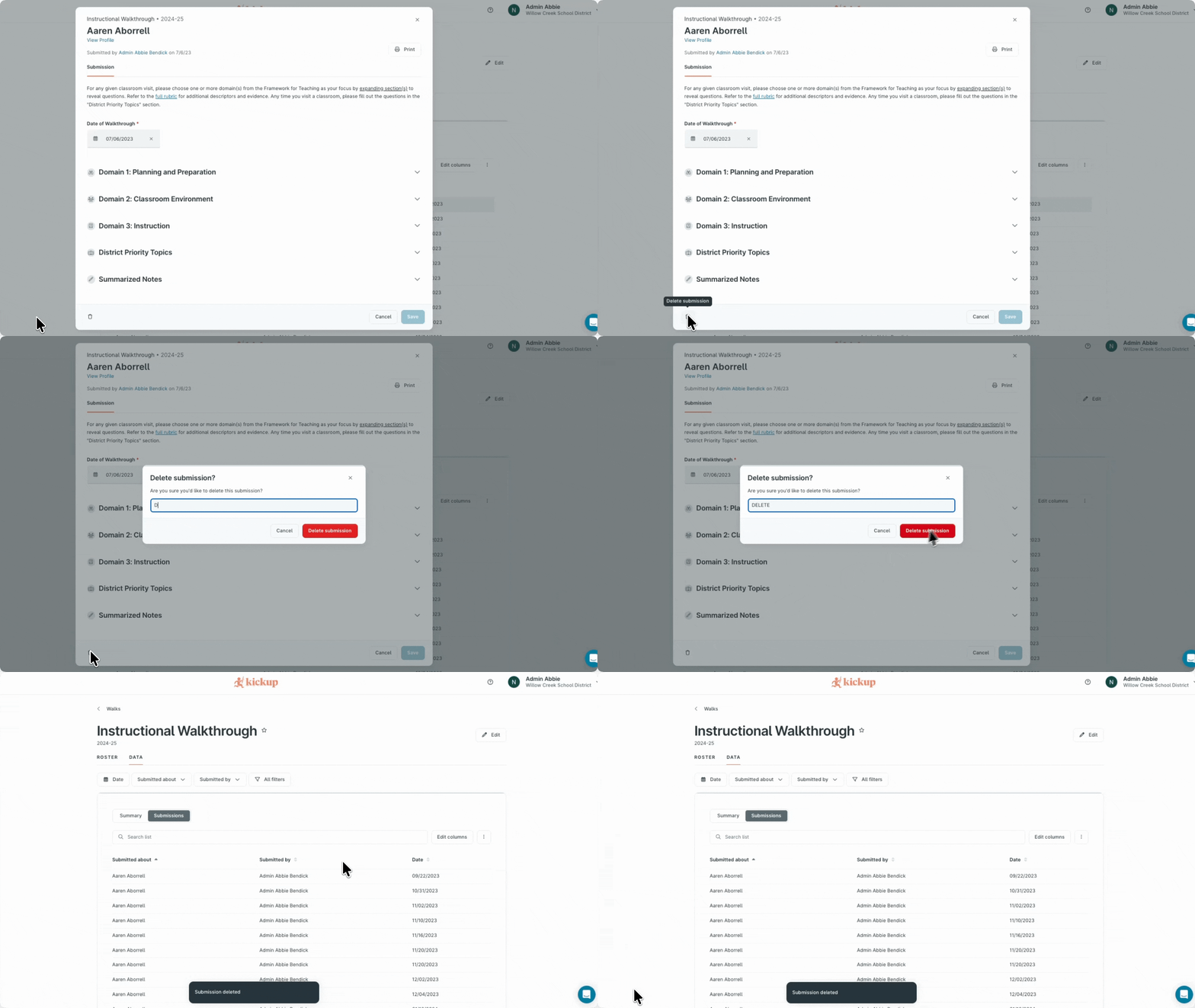
This happens all the time—someone submits the wrong walk, coaching log, PD feedback, or cycle step by mistake. Previously, the only option was to submit a support ticket or email their CSM.
Update:
Admins can now delete submissions across Learning, Foundations, and Growth:
Deletions require confirmation (including typing "delete" to proceed), and the system tracks the deletion as an activity.
Impact:
Admins can fix submission mistakes immediately without needing to contact support.
Submit your next feature request.
Why:
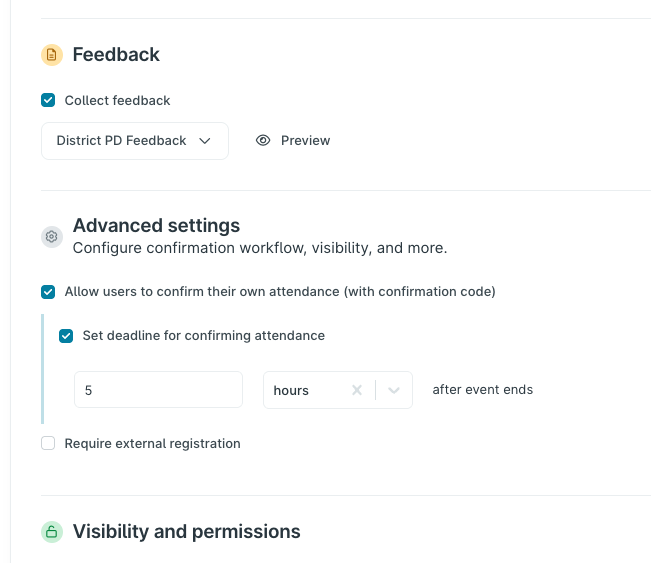
Previously, district leaders had to manually go into every event, scroll down, and uncheck "allow users to confirm their own attendance" to close the confirmation window. If they forgot, staff could technically confirm attendance months—or even years—after an event. This was especially problematic for districts in states like Michigan that upload attendance to state systems, because late confirmations got lost.
Update:
You can now set a confirmation close date for an event. After that date, staff can no longer confirm their own attendance.
Impact:
No more manually tracking down events to close confirmation windows. No more late confirmations messing up your state reporting. And if you're worried about confirmation codes being shared, this eliminates that concern—expired codes don't work.
Why:
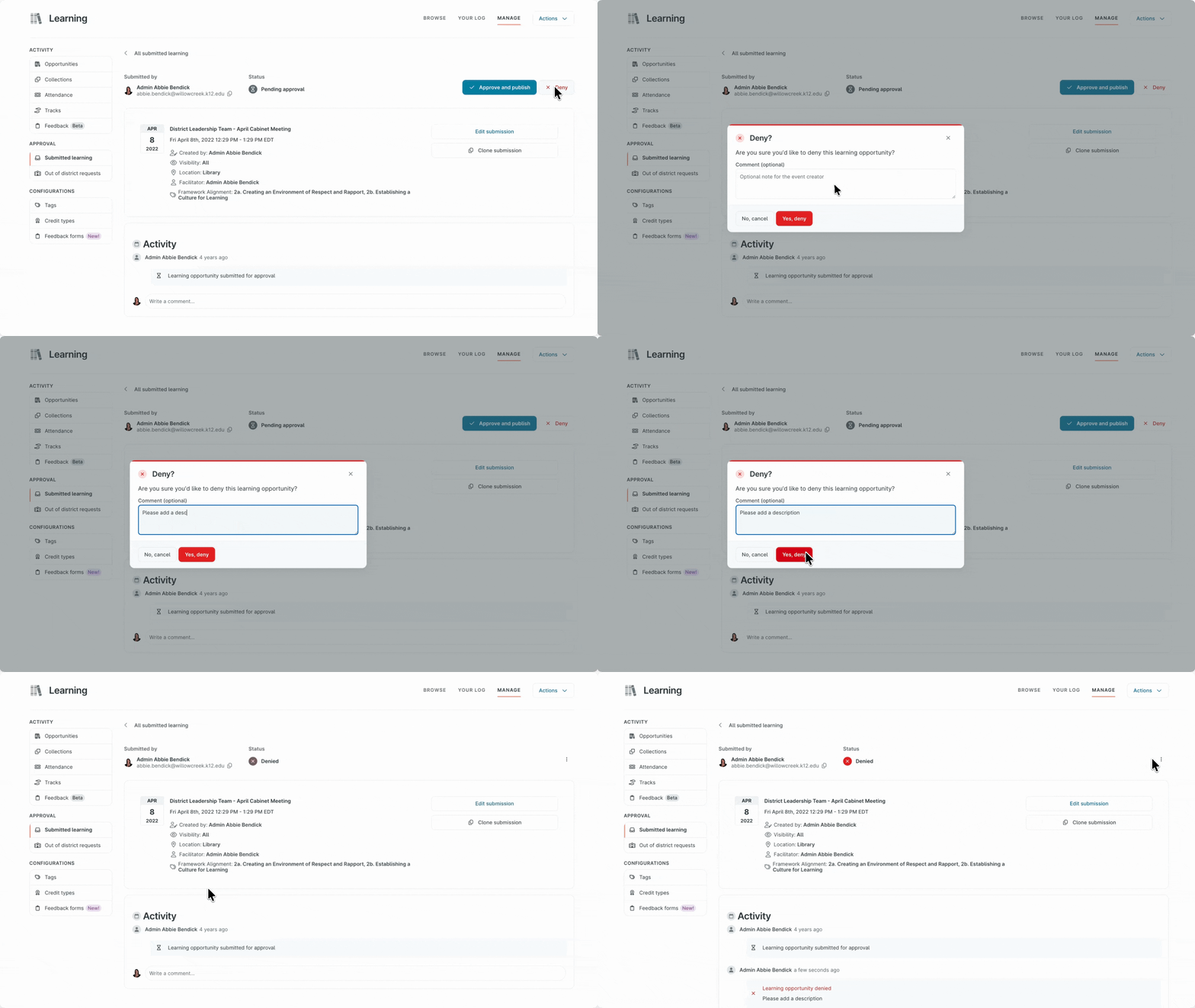
When districts have hundreds of staff members submitting events, keeping track of why an event was approved or denied becomes difficult without a record. Previously, there was no way to leave a comment when approving or denying.
Update:
When you approve or deny a submitted event, you can now leave a comment explaining why. No more back-and-forth emails or confused staff wondering what happened to their submission.
Impact:
Clear communication. Less back-and-forth. Staff understand why their event was denied and what to fix before resubmitting. This brings parity with other features where you can leave comments (like submitted assignments or out-of-district requests).
.gif)
Why:
Facilitators who manage events with hundreds—or thousands—of registrants might waste hours confirming attendance one person at a time.
Update:
You can now bulk confirm attendance for multiple people at once—no more clicking through registrants individually.
Impact:
Facilitators save hours every week. Large events no longer mean large administrative burdens. This matches the ability to bulk register people, giving you full bulk capabilities for managing attendance.
Why:
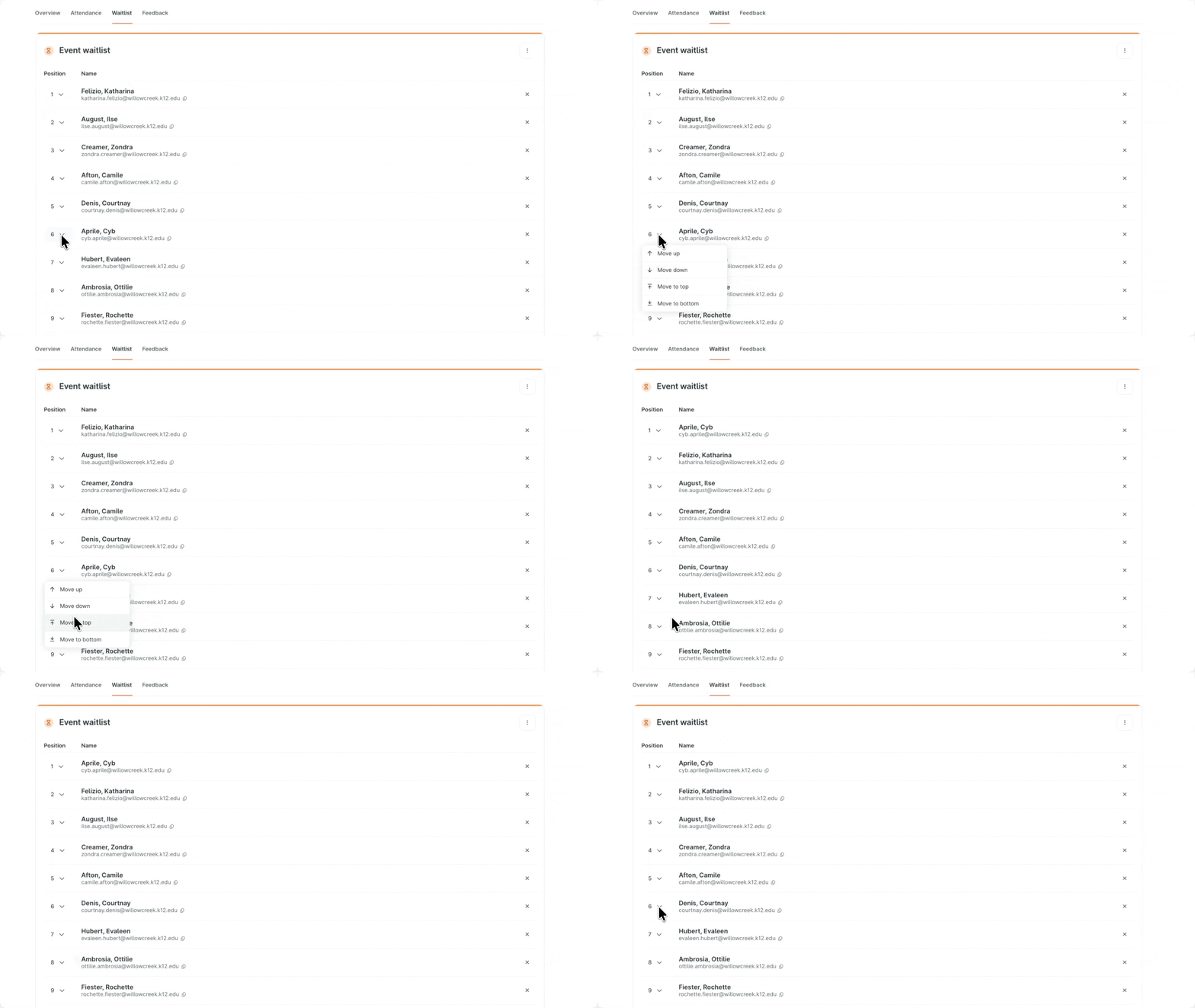
Managing waitlists required too many manual steps and workarounds. Admins needed streamlined tools to export waitlists, reorder participants, and control registration for full sessions—especially across multi-session series.
Update:
Four new capabilities make waitlist management completely smooth:
Export waitlists to CSV: Download your waitlist just like you can for registered participants.
.png)
Reorder waitlists: Move people up, down, to the top, or to the bottom with simple controls—no more impersonating dozens of people.
Add people to waitlists: When adding attendees to a full event, you can now add them directly to the waitlist instead of being forced to override seat limits.
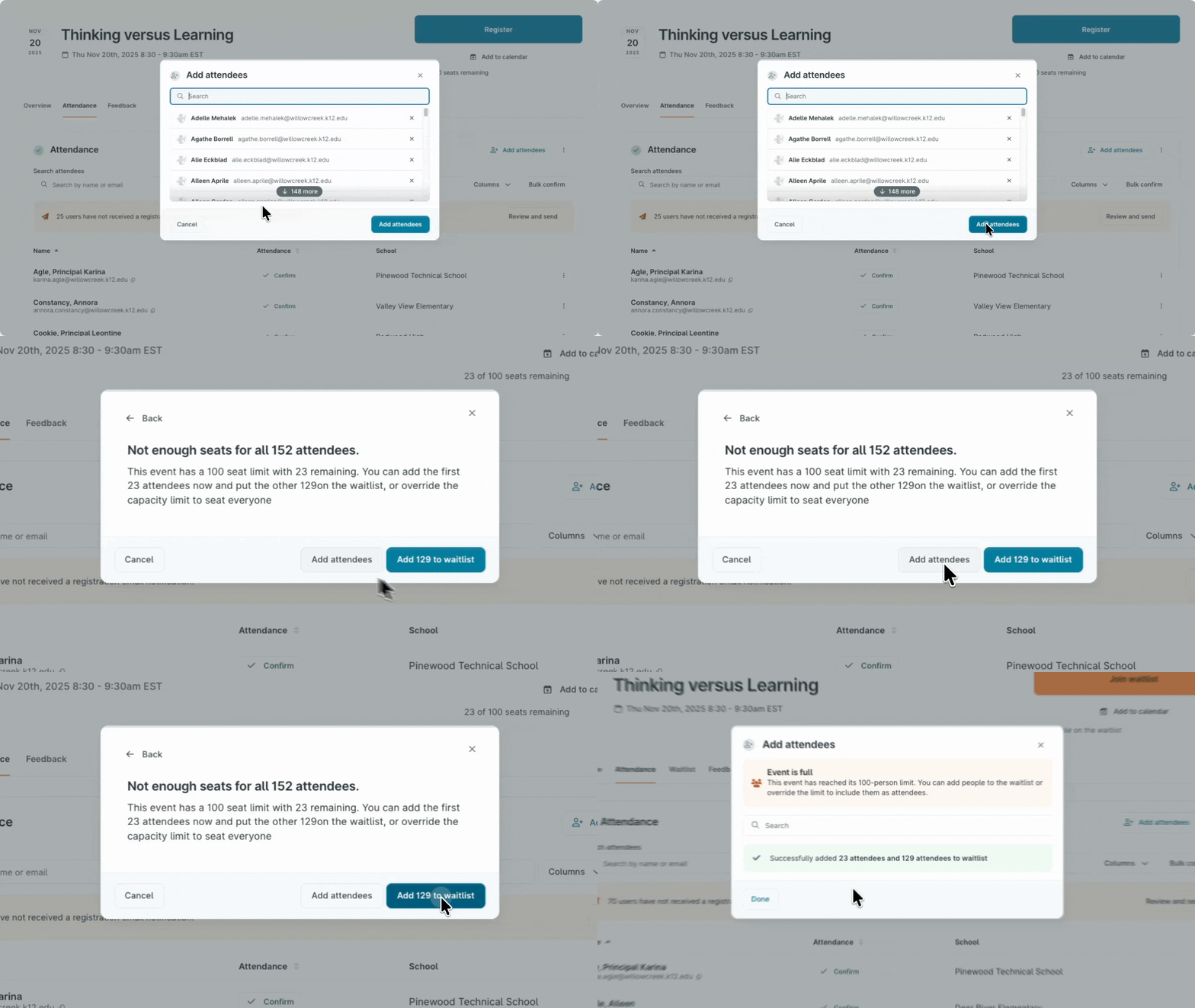
Override waitlist for series: Users with attendance management permission for a series can now register staff for that series, overriding the waitlist just like they can for individual opportunities.
Impact:
When sessions fill up, you can quickly reassign staff, communicate with waitlisted people, manage the order, and ensure the right people get into series—all without frustrating workarounds. Full control over waitlists in seconds, not hours.
.gif)
Why:
If you used Tracks to organize professional learning, every time you created a new event, you had to go back and manually add it to every relevant Track. For districts with dozens of Tracks copied across multiple schools, this meant opening each Track individually and adding the event.
Update:
When creating an event, you can now select which Tracks it should be added to. No more going back to update Tracks individually.
Impact:
Massive time savings for districts using Tracks. Principals see accurate, up-to-date progress without you having to manually update dozens of Tracks.
Why:
Previously, Illinois districts couldn't generate a single series certificate that shows total professional learning hours. This created confusion for staff and extra work for admins who had to create manual workarounds or custom credit types just to stay compliant.
Update:
When you generate an Illinois certificate for a series, KickUp now automatically sums all published learning hours within that series and displays the total on the certificate.
Impact:
Educators get one clean compliance certificate at the end of a series. Admins save time, reduce audit errors, and stop building workarounds.
1. Text Elements within Quizzes: You can now add read-only rich text elements directly within quizzes. This means scenarios, instructions, or context can appear right on the same screen as the question.
2. Simplified Series Registration: Series registration now matches the experience for individual opportunities. The "search to add" field now functions as a search bar for existing registrants, and clicking "Add attendees" opens the familiar modal where you can add individuals and groups in bulk.
3. Sort Attendance by Status: You can now sort and filter the attendance list by status, making it easy to find staff without confirmed attendance.
4. Improved Mobile Views: We've updated the calendar component to be more compact and responsive. On tablets, we've moved the calendar to a Date filter in the filter area. On mobile, the Date filter is now the primary way to navigate events, with other filters accessible as needed.
5. Resize images in event descriptions: When creating an event and adding an image, you can now resize the image within KickUp.
What else would make your work easier? Share your ideas.
Why:
Previously, you could turn off anonymous submissions in coaching, but not in walkthroughs. Some districts wanted to allow anonymous walks at the beginning of the year for calibration, then turn them off once principals start doing walks connected to specific teachers.
Update:
You can now disable anonymous walk submissions, just like you can in coaching.
Impact:
Smoother workflows. Less confusion for principals. Better parity across tools.
Why:
On the roster page, you can filter to open cycles in coaching, but there was no way to view closed cycles. This forced coaches and leads to click into individual teachers to see completed cycles.
Update:
You can now filter to view closed cycles directly from the roster page.
Impact:
Coaches and leads can quickly review completed work without clicking through every single teacher on their roster.
Why:
Some districts need to report time metrics in minutes, not hours. But dashboards, data tables, and exports previously showed hours, which meant admins had to manually convert every number to minutes before reporting.
Update:
In admin settings, you can now choose how duration is displayed: "Hours and minutes (e.g., 2:30)" or "Total minutes (e.g., 150 min)." This setting applies to dashboards, in-context tables for time data, and exports.
Impact:
No more manual conversions. Reports match your district's format automatically.
Share feedback on these Foundations updates.
.png)
Why:
In Foundations, users with managed permissions can import leads, giving certain staff access to specific data without universal permissions. But this capability didn't exist in Growth, which meant admins had to manually set up observers one by one--a long process, especially in large districts where principals need access to specific staff data but shouldn't see all data in the Growth instance.
Update:
You can now import supervisors for Growth, just like you can import leads in Foundations.
Impact:
Huge time savings for district admins during rostering. Better parity across tools.
.gif)
Why:
When adjusting steps in multiple teachers' evaluation cycles, you had to add or remove steps one person at a time. And when bulk assigning steps, if some selected users didn't already have those steps added, those users would be disabled in the interface—forcing you to assign steps separately.
Update:
Two new capabilities speed up step management:
Bulk add/remove steps: Adjust steps across multiple teachers' cycles at once.
Add steps during bulk assignment: When bulk assigning steps, a modal now lets you add steps to users who don't already have them, instead of disabling those users.
Impact:
Fewer clicks. Faster cycle adjustments. More flexibility when managing evaluation steps across your staff.
Share feedback on these Growth updates.
Schedule a demo with one of our friendly team members.

.png)
.png)