

You told us what was slowing you down. We listened. Here's what we built.
This is our fourth Customer Love Sprint—and every feature on this page exists because you asked for it. Over two weeks, we've knocked out 24 updates that save you time, reduce frustration, and make KickUp work the way you actually work.
Legacy platforms don't do this. They don't pause their roadmaps to focus on the small fixes that make a massive difference in your day-to-day. We do. Because when you waste less time fighting your software, you have more time to support educators.

Filter Growth, Coaching, and Walks rosters down to one or more schools. District coaches and observers who work across campuses find the right teacher faster, even when two staff members share a name.
Get the step-by-step in our help article →
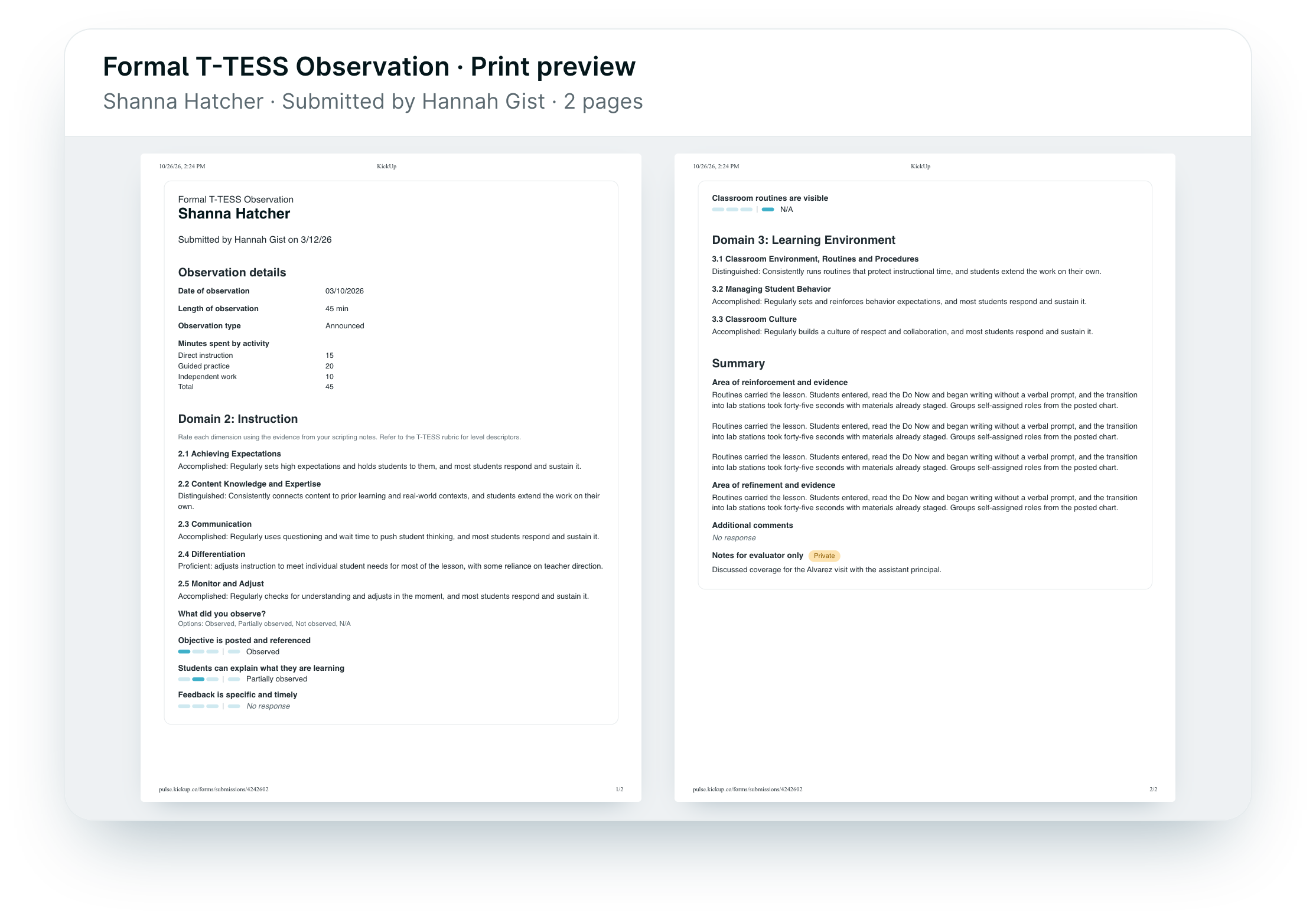
Hit Print on a submitted form and you get a condensed version made for paper, so a long observation takes a few pages instead of a stack. Principals can hand evaluations to teachers or file them without the clutter.
Get the step-by-step in our help article →

We stopped sending emails that aren’t meant for you and bundled the ones that pile up. Now, evaluators should get about half as many emails from KickUp.
Get the step-by-step in our help article →

Admins can put a banner across the top of KickUp for time-sensitive news like a weather delay, a venue change, or registration opening. Everyone sees it on every page, so nobody has to find the right event to get the message.
Get the step-by-step in our help article →

Post one announcement at the top of a collection page instead of repeating it on every event. On a conference day with dozens of sessions, you post a room change once.
Get the step-by-step in our help article →

Facilitators can mark an event announcement private, so only people registered for the event see it. Pre-work and room details reach the people who need them without showing up for everyone browsing the catalog.
Get the step-by-step in our help article →

When the confirmation deadline passes before someone confirms attendance or gives feedback, their schedule and log now say “Deadline passed.” Teachers know where they stand, and PD admins field fewer “why can’t I confirm?” questions.
Get the step-by-step in our help article →

Admins can copy a series or collection with all its events and shift every date at once. Running the same onboarding series or yearly PD again takes a few clicks instead of a rebuild, event by event.
Get the step-by-step in our help article →

The collection picker now groups collections by school year. Only this year’s (and undated) collections show by default; older years still appear when you search by name.
Get the step-by-step in our help article →

Paste an email list into the attendance modal to register staff for an event or course. KickUp calls out emails that don’t match, and you can remove them all in one click, so signing up thousands of teachers for a required course gets a lot faster.
Get the step-by-step in our help article →

Print the attendance QR codes for a whole collection or series in one go, one code per page. Conference prep no longer means opening each event to print its code.
Get the step-by-step in our help article →

Teachers can check where they stand on the Tracks their district assigned them, right from Your log. They see what’s done and what’s left without emailing an admin to ask. Admins decide whether staff can see a track.
Get the step-by-step in our help article →

Tracks can now require credits, like “3 SPED credits,” alongside specific events. Any opportunity that awards that credit type during the track’s school year counts, so certification hours show up in the same progress view.
Get the step-by-step in our help article →

Course creators can add open-response questions to a self-paced assignment, and participants type their answers right in KickUp. Written reflections no longer have to come in as uploaded documents.
Get the step-by-step in our help article →

People taking a self-paced course can edit or delete an assignment they’ve already turned in. Swapping in the right file no longer means waiting for a facilitator to send it back.
Get the step-by-step in our help article →
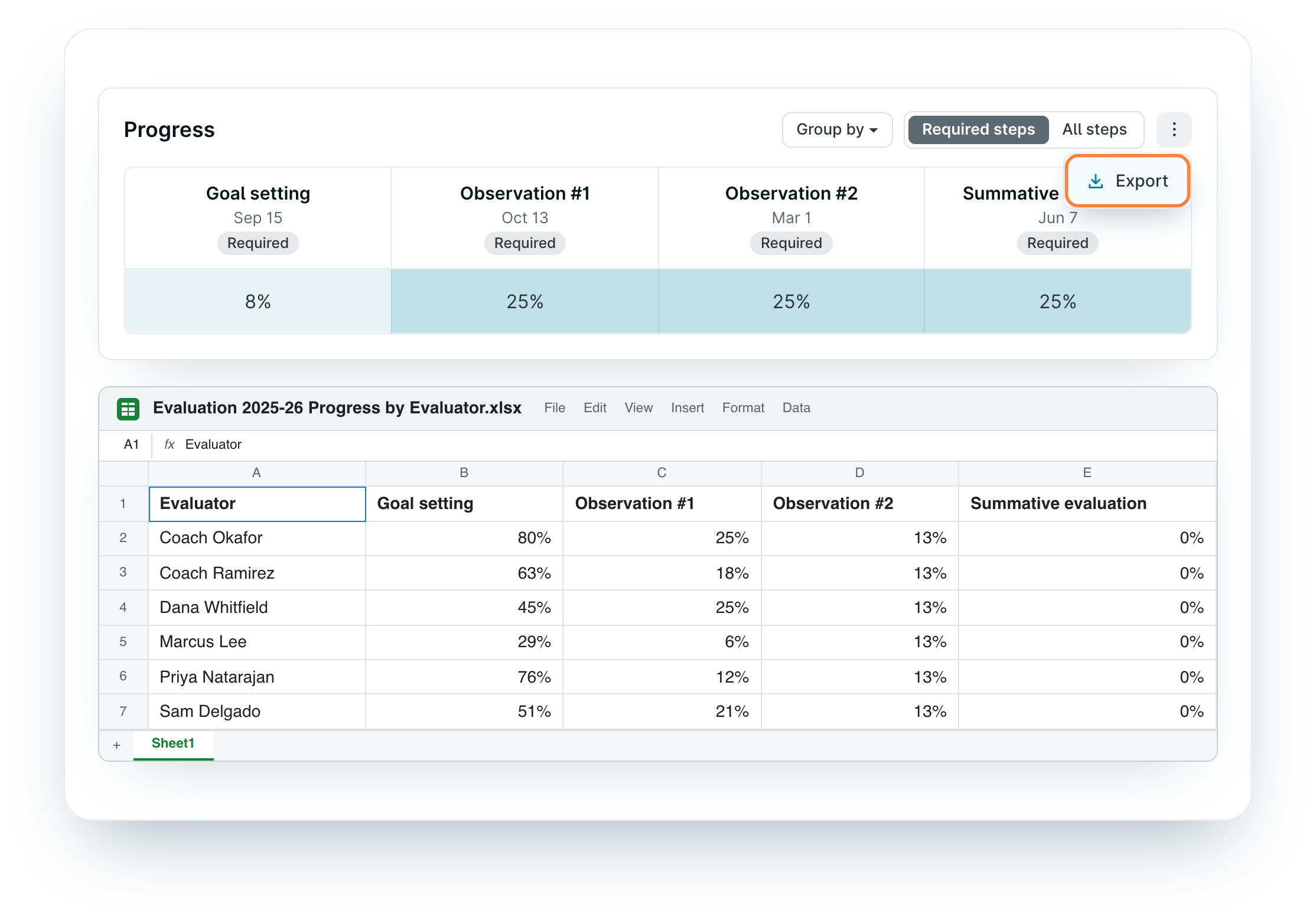
Export the Growth step progress view to a spreadsheet. Evaluation leads who report progress by evaluator or school each quarter can skip copying the numbers by hand.
Get the step-by-step in our help article →

Group the Growth step progress chart by school as well as by evaluator. Central office can see which campuses are on pace and which need a nudge before deadlines.
Get the step-by-step in our help article →

Staff can save a goal as a draft and come back to finish it later. Writing a thoughtful goal no longer has to happen in one sitting, and nothing is lost if they step away.
Get the step-by-step in our help article →

The Coaching overview now shows total coaching time for the school year, month by month. Switch between the coaching you gave and everyone’s, and choose which form questions count toward the total. Coaches with hour requirements, and program leads who report hours or pay stipends, can stop adding it up from exports.
Get the step-by-step in our help article →

Coaches can give each cycle a short name, like “Cycle 3 · Family engagement.” The name shows up on the cycle page, in reports and exports, and in emails, so it’s easy to tell what each cycle covered.
Get the step-by-step in our help article →
Staff can save a goal as a draft and come back to finish it later. Writing a thoughtful goal no longer has to happen in one sitting, and nothing is lost if they step away.
Get the step-by-step in our help article →

Walks now has an activity feed like Coaching, so teachers can respond to a walk and keep the conversation going with their observer in KickUp. Feedback becomes a two-way exchange that stays attached to the walk.
Get the step-by-step in our help article →
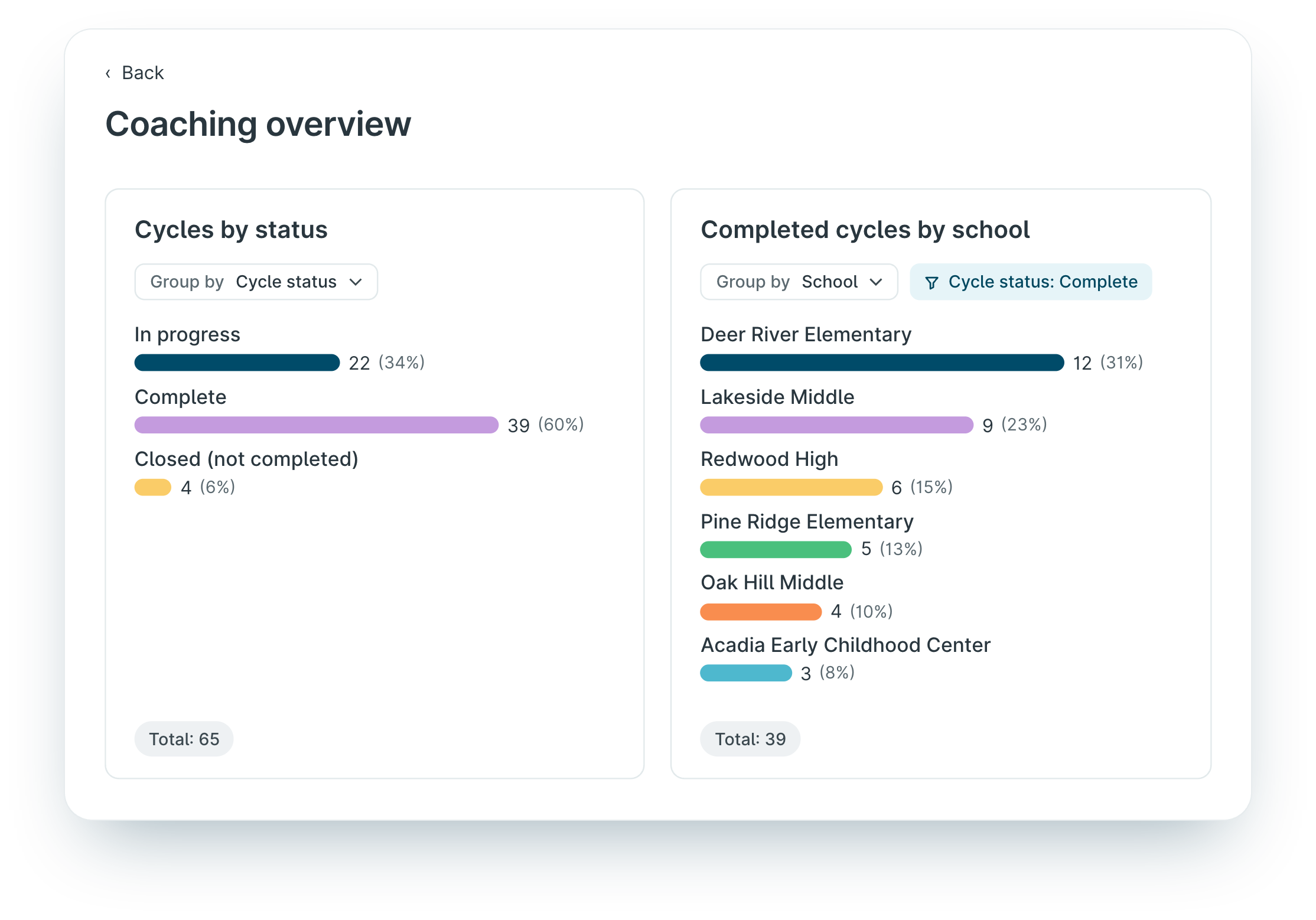
Add coaching cycle counts to a dashboard, split by status and grouped by school, coach, or staff group. Coaching leads see how many cycles are underway and complete in the same place they review the rest of their data.
Get the step-by-step in our help article →

Put Growth evaluation scores on a dashboard. Principals see scores next to the walkthrough and observation data they already review, without digging through each cycle’s Data tab.
Get the step-by-step in our help article →

Drill into any dashboard block and export exactly that data to a CSV. When someone asks for the list behind a number, it’s one click away.
Get the step-by-step in our help article →
Schedule a demo with one of our friendly team members.

