

If you've ever tried to answer a simple question, like whether last year's professional learning improved teacher practice, and found yourself pulling data from 3+ different tools to do it, you're not alone. Most districts already have some kind of system for tracking professional learning (PL). The problem usually isn't a missing system. It's that credit hours live in a spreadsheet, feedback lives in a different tool, and attendance lives somewhere else entirely. Piecing together one clear picture can take hours every month, hours that instructional leaders don't have to spare.
So when it's time to evaluate a new Professional Learning Management System (PLMS), what should district leaders look for? To find out, we read through more than a dozen PLMS RFPs issued by school systems and state education agencies between 2024 and 2026, and pulled out what came up again and again. The result is a free PLMS Buyer's Guide, built for PL leaders at districts of any size, whether you're replacing a legacy system or trying to get more out of the one you already have.
Across all those RFPs, the requirements tended to sort into three broader questions:
That first question is where most districts start. A PLMS only delivers value if people use it day to day, and four questions can surface that fast in any vendor demo:
Those four questions alone can tell you more about a platform than a feature list ever will.
The guide covers the other two buckets too: a checklist of the features that came up most often (credit and licensure tracking, dashboards, integrations, single sign-on, and more), plus what responsive, partnership-minded support looks like in practice.
It also includes a neutral look at where some of the most familiar PLMS names in K-12 (Frontline, PowerSchool, Eduphoria) got their start and what they were built to do, since a platform's starting point says a lot about where it's strong and where it's stretched thin.
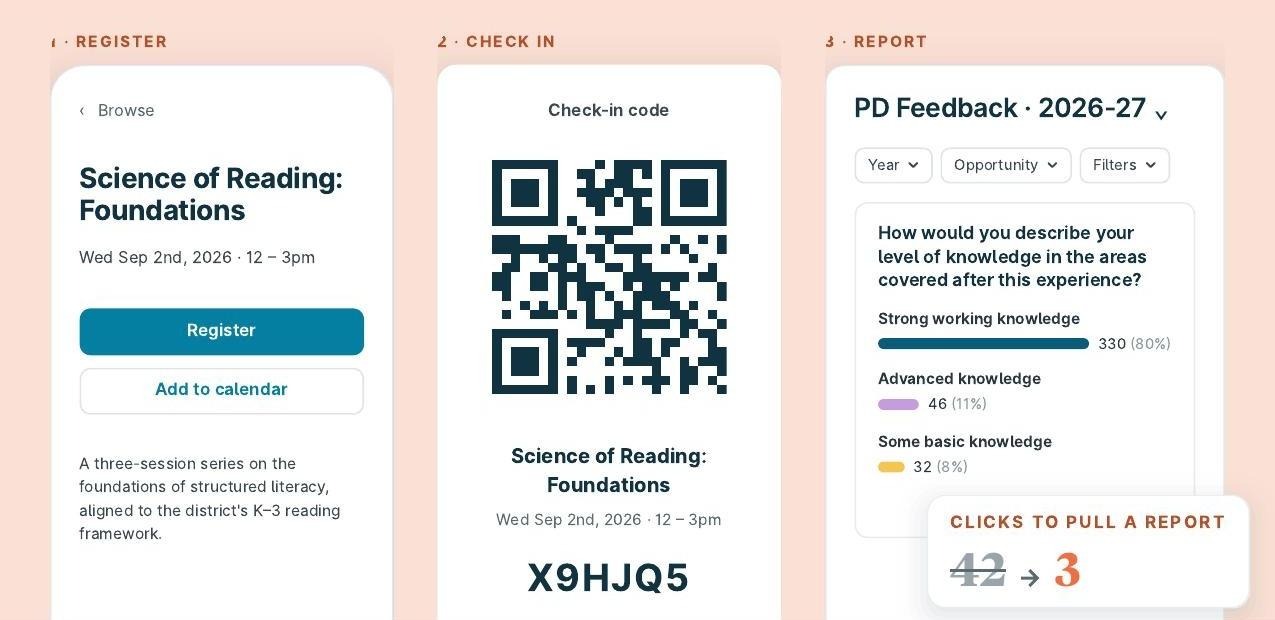
The second half of the guide goes back through the same checklist from our side, so you can check KickUp against your own must-haves one requirement at a time, and hear how district leaders using it day to day describe the experience. You’ll see how a teacher registers and checks in, how KickUp connects to the systems you already run, and what onboarding looks like.
Whether or not KickUp ends up on your shortlist, this is the list we’d want in hand before a single demo gets scheduled. [Download the full PLMS Buyer’s Guide] for the complete checklist, the three-question framework, and a section-by-section look at how KickUp handles each requirement.
Whether or not KickUp ends up on your shortlist, this is the list we'd want in hand before a single demo gets scheduled.
Download the full PLMS Buyer's Guide for the complete checklist, the three-question framework, and a look at how KickUp stacks up.
Schedule a demo with one of our friendly team members.

.png)